Why Is My Vizio TV So Slow? (Proven Speed Increase)
Vizio is one of the top TV manufacturers in the country, which makes sense – they make an amazing product. But as is the case with all things connected to the internet, speed and lag are common issues.
Luckily there are several proven ways you can increase the speed of your Vizio TV.
Why Is My Vizio TV So Slow?
The most common reason your Vizio TV is so slow is because of a bad internet connection. Connect to your router’s 5GHz band (not 2.4GHz), make sure your router is close to your Vizio TV, and ask family members to get offline. Try an Ethernet connection if none of that works.
Improving your internet connection is the best way to improve the speed of your Vizio TV, and reduce the lag you’re experiencing…
Check Internet connection
For the best viewing experience, I recommend a minimum download speed of 3.0 Mbps for SD content, and up to 9.0 Mbps for HD.
There are a few quick ways to test your Internet speed. The first is by using speedtest.net. Use your phone or laptop and stand right next to your Vizio TV and press GO.
We really want to see a download speed of 25Mbps or higher during this test. Yes, you might be able to get away with 3Mbps, but remember, that’s the minimum requirement. Plus, 25Mbps is on the low end these days.
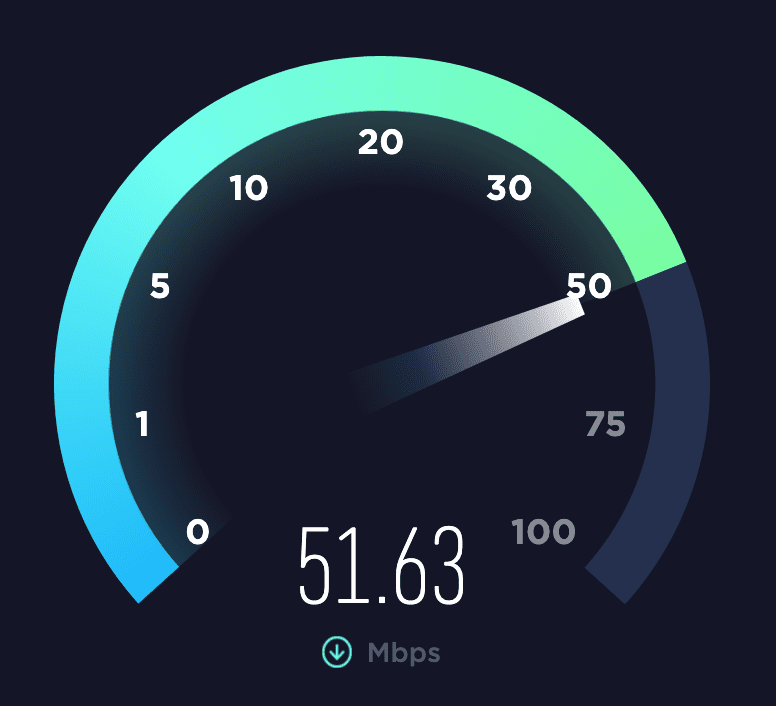
If you’re not passing any of this test, I would double check with your ISP (Internet service provider) and confirm what Internet speed you have.
You can also try unplugging your router for 60 seconds before plugging it back in. Wait another 2 minutes for it to reconnect and see if you still have a speed problem.
If this doesn’t work, read on.
Make sure Vizio TV is connected to the 5GHz network
This may be more obvious these days, but make sure your Vizio is connected to your 5GHz WiFi band!
Almost all routers now have what’s called “dual-band” radio signals. This gives you the ability to connect devices in your home to two different networks (either the 2.4 GHz or 5.0 GHz network).
Having two separate networks allows for faster speeds and flexibility. The dual-bands avoid connection issues and interferences and provides more stability overall.
If you need a longer range, you typically connect to the 2.4 GHz band, but the 5 GHz band is ideal if you need faster speeds and higher performances.
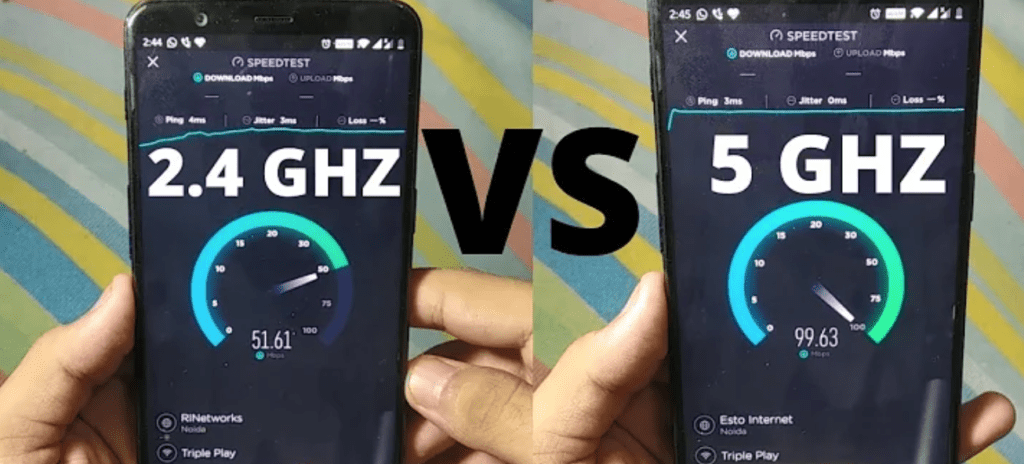
The trade off with the 5.0GHz band is that you really need to be close to your router. Which brings me to my next point.
Move your router closer to your Vizio TV
This might be difficult to do depending on how big your home is and the number of smart TVs you have, but the closer your router is to your Vizio, the better performance you’ll get.
If moving your router isn’t a possibility, then consider buying a few WiFi extenders. These are usually priced really well and they can be plugged directly into any wall outlet. The difference they make is amazing.
Some other tips regarding router placement in your home:
- If you can, mount your router up higher. Routers spread signals downward, so if you can get it up off the ground, you’ll be in business.
- Try to avoid placing your router close to other electronics that might cause interference.
- If your router has antennas, point one vertical, and the other horizontal to get the most coverage.
See if these changes improved your Vizio TV speed.
Don’t overcrowd your WiFi network
If everyone in your house is trying to stream content onto their devices at the same time, it’s going to put a pretty big strain on your WiFi network.
Your router can only handle so many simultaneous connections at once before performance starts to degrade. This could very well be what’s causing your Vizio TV to slow way down.
The simplest solution here is to turn off any devices not in use and make sure only a few people are using the Internet at the same time.
Hardwire your Vizio TV using an ethernet cable
If your WiFi is still an issue after following all the steps above, one option is to connect your Vizio TV directly to your router with an Ethernet cable.
While WiFi is almost always more convenient than Ethernet, Ethernet is faster, more secure and more reliable overall.
Take one end of your Ethernet cable and connect it to your router, and the take the other end of the cable and connect it to the Ethernet port on the back of your Vizio TV.
Once this is done, perform the speed tests again (detailed above) and see if there was any improvement.
Reset your Vizio TV
Now that we’ve addressed the Internet connection, it’s time to try a few final fixes.
Issues like the screen freezing, apps crashing, sound acting up, TV buffering and slowness, etc. can all be caused by your Vizio’s cache.
Since you’re experiencing slowness, let’s reset your Vizio and clear the cache.
With the TV powered on (hopefully unplugging it or removing the remote batteries was able to temporarily power the TV) click the Menu button.
Within the menu there should be a “System” option, click it. Then find “Reset & Admin” and “Reset TV to Factory Defaults”. Sometimes the Vizio TV will ask for a code before resetting the TV. If it does the default code is four zeros, 0000.
Your Vizio TV should reboot once or twice total. Give it some time, you should see the home screen appear and stay up for at least 10 seconds before using your Vizio TV again.
That’s it, your cache is cleared and hopefully your speed has improved!
System update for Vizio TV
Your Vizio can also slow down a lot if the software isn’t up to date. To correct this problem, check for any Vizio OS updates in the settings menu.
All you need to do is look for the newest firmware update available for your TV model. Most of the time these updates happen automatically, but occasionally they get missed.
To update your Vizio TV’s firmware, turn on your TV and click “Menu” on your remote. Then scroll down and select “System”.
You should see “Check for Updates”, click on it.
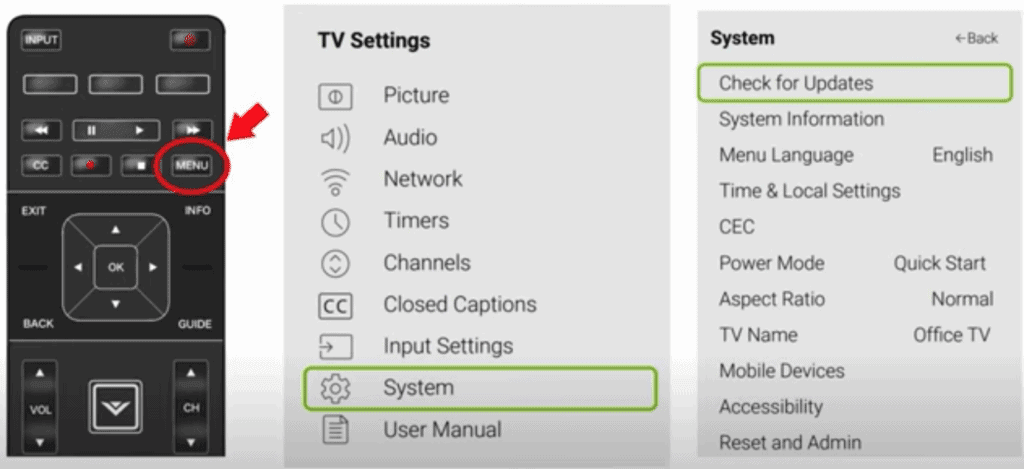
Your TV will now automatically start to look for any available updates. If there is a new one, your TV will install it for you.
You’ll want to ensure you update your Vizio TV often to keep up with the newest software!
Use a streaming device instead of SmartCast
Smartcast is Vizio’s built in app platform that runs on everyone of their TVs. If you’ve ever used Chromecast or Amazon Firestick, SmartCast is very similar.
It provides you with access to hundreds of other streaming apps, like Netflix, Hulu, YouTube and more. You can install these apps directly to your Vizio TV using SmartCast.
The problem is, SmartCast can be SLOW. It simply wasn’t developed with the same level of care and attention as a Chromecast, Firestick or Roku.
The solution? Simply buy one of those streaming devices and use that as your app platform. Speed should improve dramatically.
Vizio TV support
If you tried all the troubleshooting steps above and your Vizio TV is still slow, you should contact the Vizio TV support team directly.
They can be reached at 1-844-254-8087.
- Monday – Friday, 8:00 AM – 11:00 PM CST
- Saturday – Sunday, 8:00 AM – 9:00 PM CST
(Shortest wait times are Monday – Friday, 1:00 PM – 5:00 PM CST).
You can also try using their Text Message support or Live Agent chat.
Vizio TV warranty
You can also check online to see if your TV is covered under Vizio’s warranty.
Unfortunately Vizio TV warranties typically only last 1 year and most of the cases I’m hearing of TV slowness are from TVs that are already several years old.
Still worth a shot.
Conclusion
If your Vizio TV is slow, don’t panic, there are several proven fixes you can try to get things back up and running smoothly.
- Confirm that you’re getting 25Mbps download speeds
- Make sure your Vizio is connected to your router’s 5GHz band
- Move your router closer to your Vizio
- Don’t overcrowd your WiFi network with too many connected devices
- Connect your Vizio TV to the router directly using an ethernet cable
- Reset your Vizio
- Update your Vizio’s software
- Use a streaming device instead of SmartCast
If none of these work, you should reach out to Vizio support directly.