Do Vizio TVs Have Bluetooth? (Two Workarounds!)
Many smart TVs include Bluetooth connectivity as a feature so you can connect your favorite pair of headphones. This is a great feature for anyone trying to keep the noise down so they don’t disturb their partners, or even better, so you aren’t disturbed by your kids!
Do Vizio TVs have Bluetooth?
The short answer is it depends! Most of the latest Vizio smart TV models now include built-in Bluetooth connectivity. But, this is a relatively new feature for Vizio, so older models likely do NOT have built-in Bluetooth connectivity.
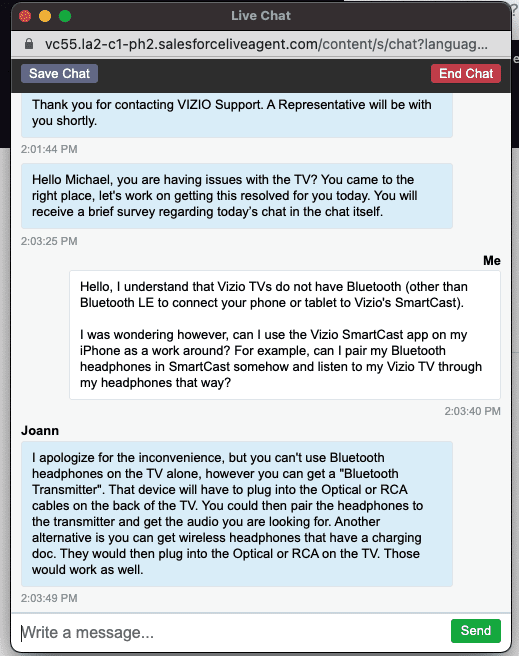
Until recently, new Vizio TVs did NOT have Bluetooth and you could NOT use Vizio’s SmartCast app as a workaround either. While some Vizio TVs have “Bluetooth LE” (low energy Bluetooth), this can only be used to connect your TV to the SmartCast mobile app! You cannot connect Bluetooth headphones or speakers.
So the official stance that Vizio had taken is, aside from the Bluetooth LE, which can ONLY be used to pair the SmartCast mobile app, Vizio TVs did not support Bluetooth!
Here is a screenshot of my conversation with Vizio support confirming this just a few years ago:
Which Vizio TVs have Bluetooth Connectivity?
As of this writing, the latest models of Vizio smart TVs are being advertised to have Bluetooth connectivity except their OLED series. This includes the D-series, V-series, M-series, and P-series.
It’s safe to assume that as Vizio updates its models and releases a new OLED series, they will all include Bluetooth.
However, when you are buying a TV, double-check the features to confirm this. Retailers could still be selling older models of the brand, so double-checking is always worth it, especially if it’s an important feature to you.
How do I know if my Vizio TV has Bluetooth?
If you are sitting at home and have already unboxed and set up your Vizio TV, there are two easy ways to check if your model has Bluetooth connectivity.
Option 1: Check the TVs Settings
1. Using your remote, select the settings or menu button.
2. Within the settings, there would be a “Bluetooth Headphones” title, if your TV has that feature.
If you do not see that title, then I’m sorry to say, that you do not have Bluetooth.
Option 2: Check the manual
If you have the manual lying around, you can look through it to confirm if you have Bluetooth connectivity.
If you do not have the manual or you don’t want to look for it, you can use this link to search on the Vizio website. You’ll need the model number of your TV. On the page, there’s a section to help you find where the model number is located.
Hint: If you haven’t unboxed your TV or have not even purchased it, this is a great way to confirm all the features of your TV before you start using it.
How do you pair Bluetooth headphones to a Vizio TV?
Once you’ve confirmed that your model does in fact have Bluetooth, how do you set up and pair your headphones?
1. Using your remote, select the settings or menu button.
2. Within the settings, select the “Bluetooth Headphones” title.
3. Now start the pairing process with the device you’d like to pair. Each device is different, but there may be a small button on your headphones or charging case that you need to hold down like for AirPods.
4. Once the device pops up on the Vizio screen, select it. If you don’t see it, you can also try selecting “Other Devices”
If that does not work, start the process again. Sometimes the timing needs to be just right.
Enabling Bluetooth on your Vizio TV using a workaround
If you have an older model that does not have Bluetooth connectivity, the somewhat good news here is that there are two decent workarounds if you are really desperate to use your Bluetooth headphones or speakers with your Vizio TV.
The first is by buying a Bluetooth transmitter, and the second is by connecting directly to the Audio Out ports on your Vizio TV.
Option 1: Bluetooth transmitter
A Bluetooth transmitter is simply a product that plugs into a non-Bluetooth-enabled device (in this case, your Vizio smart TV) and turns it into a fully functioning Bluetooth device.
These days the technology has gotten so good that there is very low latency with these devices (meaning the sound will come near real-time, without delay).
There are many options available on Amazon and there is one that is just right for your TV. You’ll need to confirm which ports are available on your TV to connect to. Here is one option available on Amazon.
This one does require a headphone jack (AUX) on your TV, so make sure you have one before buying it.
If your TV doesn’t have a headphone jack, no problem. Here is another option available on Amazon. It also has great reviews and it offers multiple different options for setup (Optical, Aux, RCA, USB).
Option 2: “Audio Out” port
If you don’t want to buy an entirely new device, you can try connecting your Bluetooth device directly to your TV using the Audio Out ports on the back.
The key here is to check the available connections on your Bluetooth device and see if those connections are compatible with your Vizio TV’S Audio Out ports.
Basically, what you’re looking for is an Aux port (headphone jack) on your Bluetooth device and a Red and White Analog out port on your TV. If you have that, you can likely connect directly!
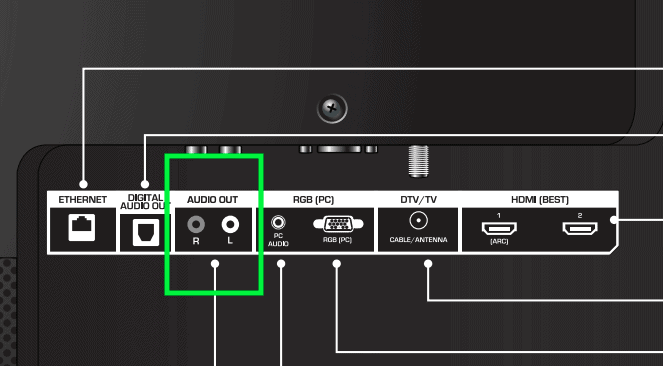
Vizio support has a decent write-up detailing how to do this.
Vizio SmartCast app
SmartCast is Vizio’s in-house streaming platform. It’s built directly into Vizio TVs and it allows you to stream, control, and connect to content on your TV.
If you’ve heard of Roku, SmartCast is basically the same thing.
Stream
On the streaming front, SmartCast offers tons of streaming apps like Netflix, Hulu, YouTube TV, Disney+, HBO Max, etc…all available out of the box.
Of course, you’ll need separate subscriptions to these services in order to use them, but the apps are available to you directly on your Vizio TV.
Here is a list of all the smart TV apps Vizio SmartCast offers.
Control
There’s also a Vizio SmartCast mobile app that you can download for free from the Google Play store or the Apple App store.
Once it’s downloaded you can sync to your TV directly from your phone (using your Vizio TV’s built-in Bluetooth LE) and start using your phone as a remote!
You can even use speech commands through the app to control your TV.
Some other benefits include being able to pull up an entire keyboard when you’re typing or searching for a title. Typing with the Vizio remote can be flat-out painful, so this is a pretty neat feature.
Cast
Finally, you can cast your phone, tablet, or laptop directly to your Vizio TV using Apple Airplay and Chromecast, built directly into your TV.
So if you want to pull up some family photos during your next get-together or even cast your next Peloton ride straight to your TV, it’s all possible.
The nice thing about SmartCast is that it is continually getting worked on and improved by the Vizio team. Anytime there is an update, you get it automatically, for free, via a software update!
Can you use Vizio SmartCast as a Bluetooth workaround?
If you’ve owned a Roku TV before, you might be wondering if you can use the Vizio SmartCast app as a Bluetooth workaround.
You see, similar to Vizio TVs, Roku TVs don’t have Bluetooth built-in but they do offer a smartphone app that allows you to use your phone as a remote.
This Roku app has a feature called “private listening” that allows you to pair your Bluetooth audio device to your mobile phone and listen to your TV through it!
Unfortunately, the Vizio SmartCast app does not currently allow you to do this.
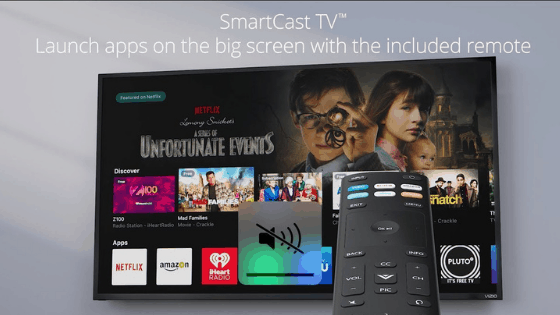
It’s a bummer because I don’t think it would be too much trouble for Vizio to enable this and I am certain there is a demand for it.
Who knows though, apps are being updated all the time, so maybe there is hope for the future.
Conclusion
It depends! The latest Vizio smart TVs now come with Bluetooth connectivity, so be sure to confirm.
Older Vizio TVs do not come Bluetooth enabled. While they do have something called “low-energy Bluetooth,” that capability can only be used to sync your mobile phone with Vizio SmartCast. You cannot connect your Bluetooth headphones or speakers.
However, there are two possible workarounds. The first involves using a Bluetooth transmitter and the second requires you to use the “Audio Out” port on the back of your Vizio TV.
I know this isn’t ideal for everyone though, so if that’s you, I compiled a list of other TV brands and models that come fully Bluetooth enabled.
I hope this was helpful and that you were able to get your Bluetooth device synced up with your Vizio TV! Thanks for reading!