Can You Drop in on Alexa Without Them Knowing (Silent Eavesdrop?)
Amazon Alexa first introduced its drop in feature to Alexa-enabled devices in mid-2017. Its release caused many to voice their concerns about privacy.
But can you drop in on Alexa without them knowing? No, you can’t silently eavesdrop with Alexa’s drop in feature. When someone drops into an Alexa-enabled device, that device makes a distinct ringing noise and continuously flashes a green-light, for as long as the drop in occurs. Neither can be turned off.
What is Alexa’s drop in feature?
The drop in feature essentially serves as an intercom – it allows you to connect instantly with any of your Alexa-enabled devices.
You can even drop in on someone else’s Alexa-enabled device if they give you permission to do so.
In the Alexa app, click the “Communicate” tab at the bottom and then “Drop in” at the top. A list of Alexa-enabled devices that you have permission to drop in on will pop up.
Once you click on the device you want to drop in on, that device will start “listening” and you’ll be able to hear everything on your end (either through your phone or another Alexa-enabled device).
And the person on the other end will be able to communicate back to you, by speaking to the Alexa-enabled device that was dropped in on.
So, for example, let’s say you’re upstairs in your office working and you hear a lot of noise coming from your son’s room which has an Echo dot. You can use your phone to drop in on him and ask him to quiet down.
Or say your mom is getting older and you want to be able to check in on her from time to time. You could set up an Echo Show in her living room and give yourself permission to drop in on it.
There are endless use cases that make the drop in feature quite compelling, especially when you start adding more and more Alexa-enabled devices to your home.
What happens when you drop in?
The first thing that happens when you drop in is that the device you’re dropping into makes a sound, alerting anyone around that a drop in has started.
In most cases, this sound is a ring, which lasts about 2-3 seconds. While this ring can be turned down by lowering the overall volume of the device, it cannot be shut off completely.
The next thing that happens is the Alexa-enabled device will begin to flash green.
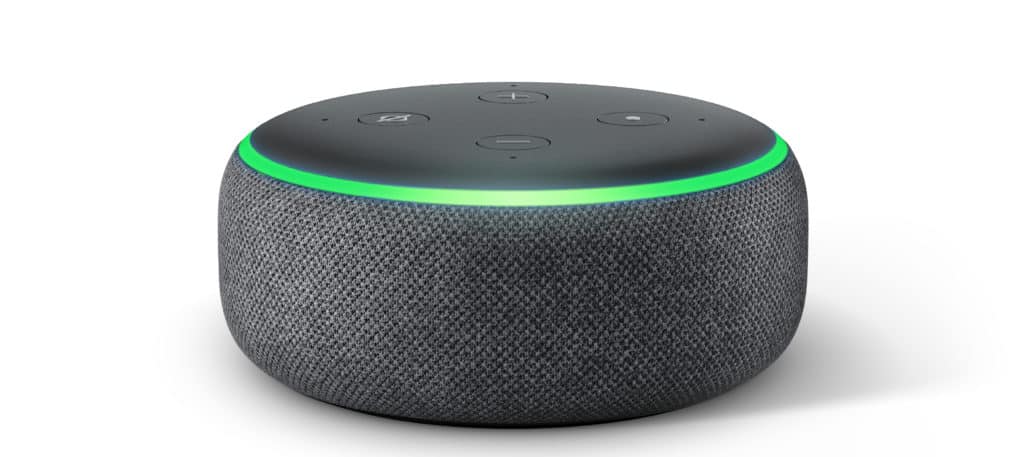
If it’s the Echo Dot, the device will show a green ring that continuously glows while you’re actively dropping in.
If it’s the Echo Show, this light will pulse in a straight line, and you’ll have the video component.
When you end the drop in, the device you dropped in on will make a final chime, indicating to the person being dropped in on that the “call” has ended.
The drop in sounds and the green light notifications cannot be disabled.
Can you disable drop in?
The good news is that all Amazon Alexa-enabled devices come with the drop in feature disabled.
You have to take several manual steps yourself, within the Alexa app, in order to enable drop in on any of your devices.
Alternatively, you can say, “Alexa, disable/enable drop in”. This will disable drop in for all of your Amazon-enabled devices at once.
To confirm in the Alexa app that Alexa’s drop in feature is in fact, disabled, or to disable it after it’s been enabled, follow these steps:
- Open the Alexa app and select “Devices” at the bottom
- Then select “Echo and Alexa” at the top
- A list of all Alexa-enabled devices will appear- click the one you want to disable drop in on
- Now scroll down and click on “Communications”
- Then select “Drop In.” Here you can turn drop in “Off”
Again, your devices should come with the drop in feature already disabled. That said, you can follow the steps above for each and every one of your Alexa-enabled devices to confirm if you’d like.
Another way to ensure that no one can drop in on you is to turn on “do not disturb” mode. This will effectively mute drop in.
In addition to stopping anyone from dropping in, do not disturb mode will also stop any incoming calls or notifications.
You can enable it by saying, “Alexa, do not disturb me.” To turn this off, say, “Alexa, turn off do not disturb mode.”
What are the different ways to call and drop in on Alexa?
In addition to using Alexa’s drop in feature, you can “call” into Alexa enabled devices in a few other ways.
The first is to actually place a phone call using the native call options that come with your device. By this, I mean you can call a phone number from your Alexa-enabled device and vice-versa.
This is great for hands-free communication.
To use this functionality you’ll have to allow Alexa access to your contacts. Once you’ve done that, you can simply say, “Alexa, call Home” or “Alexa, call [name of contact],” and your Alexa device will place the call.
Of course, you will need your smartphone nearby in order for this to work.
Another way you can place calls with Alexa is to enable Skype.
The caveat here is that you will first need a Skype account. You’ll also need your Skype contacts to be set up.
Once those are in place you can go into the Alexa app, then go to “More,” “Settings,” “Communicate,” and link your Skype account.
To make a Skype call, simply say, “Alexa, Skype [name of contact].”
If you’re interested in how either of these methods works in more detail, check out this video:

Conclusion
Amazon Alexa’s drop in feature acts more or less like an intercom system. It allows you to use your phone or Alexa-enabled device to “drop in” on another Alexa-enabled device.
The device that is being dropped in on will ring for a few seconds. It will then show a green light, for as long as the drop in occurs.
When the drop in ends the device that was dropped in on will make a final chime, indicating the “call” is over.
But can you drop in on Alexa without them knowing?
The sounds and lights alerting anyone around the device that a drop in has started (or is underway) cannot be shut off or disabled.
The drop in feature is automatically disabled and needs to be enabled by the owner in order to use it.
In addition to the drop in feature, users can place direct calls and enable Skype on their Alexa-enabled devices.
Now you know there will be no silent eavesdropping with Alexa. I hope this article was helpful. Thanks for reading!