Do LG TVs Have Bluetooth? (YES, Here’s How to Connect…)
Of all the TV brands on the market today, LG may have the most Bluetooth-enabled options. Nearly every TV they make comes with Bluetooth 5.0 enabled.
Do LG TVs Have Bluetooth?
Yes, the following LG TV series have Bluetooth: OLED, QNED MiniLED, NanoCell, and 4K Ultra. To enable Bluetooth on your LG TV, go to Settings > Sound > Sound Out > LG Sound Snyc Bluetooth > Detect, and then select your device. Make sure the device you’re connecting is in pairing mode- otherwise, it won’t appear!
How to enable Bluetooth on your LG TV
Before we dive into the exact steps to follow to get your Bluetooth working on your TV, ensure that the device you are trying to pair is in pairing mode!
I know this sounds obvious but you would be surprised how often people run into this issue.
They don’t see their headphones or soundbar in the Bluetooth drop-down menu because they never put their device in pairing mode.
Every device requires something slightly different to prepare it for pairing mode. Air-pods, for example, require you to press and hold the button on the case until the white light starts blinking.
Most other devices follow a similar pairing process.
OK, now that your device is in pairing mode, enable Bluetooth on your LG TV by following these steps:
1. Click on “Settings.” If your remote has a gear icon, go ahead and click it. If not, you might have to first click on “Menu” and then navigate to “Settings.”
2. Then select “Advanced Settings.”
3. Navigate to the “Sound” menu and then select “Sound Out.”
4. Select “LG Sound Snyc Bluetooth” then select “Detect”
5. Pick your device from the list to start pairing!
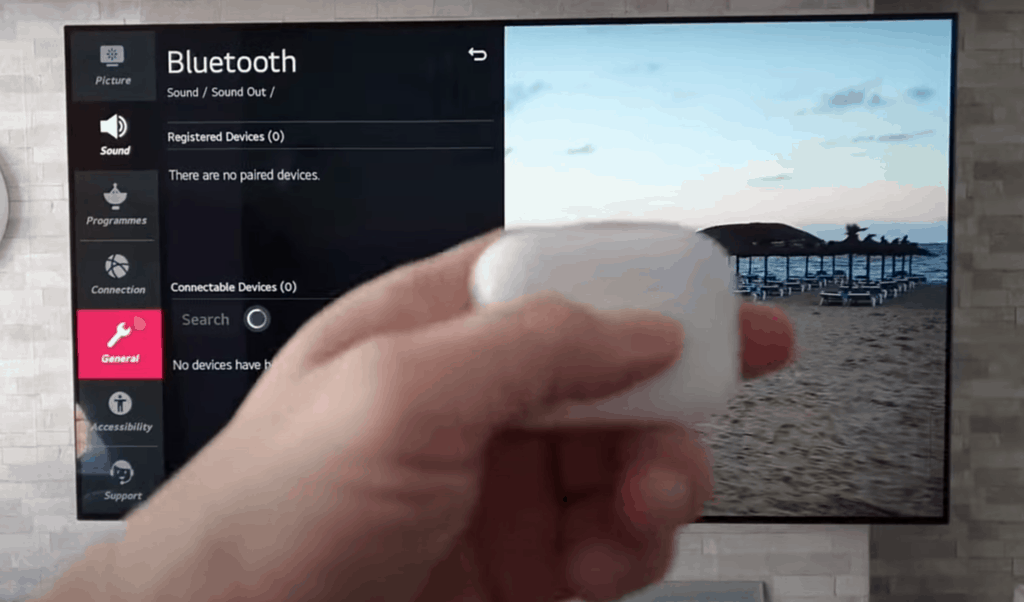
Once you’ve enabled Bluetooth, it can take a few seconds before you hear audio after turning on the TV.
That’s because when you turn your TV on, it sends a Bluetooth signal that takes a moment before it connects. So don’t worry if when the next time you turn on your TV, you don’t hear anything right away.
If you’re having any issues connecting your Bluetooth device to your TV, try using the LG Easy Bluetooth Connect Guide.
You should also try some of my troubleshooting steps detailed below.
How to check if your LG TV has Bluetooth
The easiest way to confirm whether a specific class of LG TV has Bluetooth or not is to visit the LG website and check the specifications of your exact television.
You can use the filters on the left-hand side to narrow down your search.
Once you’ve found your TV, click on it. This will pull up a full page dedicated to your exact TV with all the details.
Look for the “SPECS” tab and click on it.
Then, if you scroll down to the “Connectivity” section, you should see a line item for “Bluetooth Support.”
If it says “Yes” or “Version 5.0,” then you have your answer!
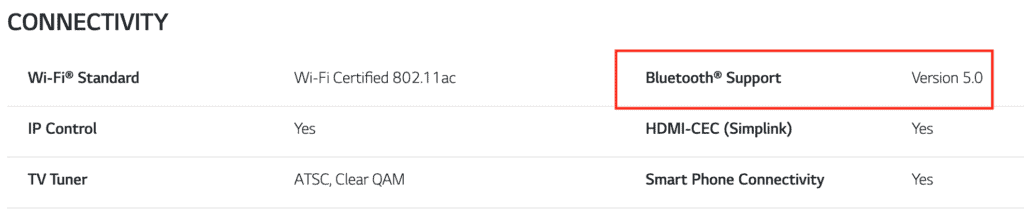
LG provides a ton of interesting info about your TV here, so feel free to poke around a bit. You can find out if your TV is integrated with any Voice Assistants, like Google Home or Amazon Alexa.
There are also details about Intelligent Voice Recognition, TV response time for gaming, and much more!
Troubleshooting LG TV Bluetooth connection issues
Occasionally you’ll run into some issues getting your device to connect to your LG TV’s Bluetooth.
If you do, don’t panic. Here are some of the most common fixes you should try. All of them take no more than a minute or two and are easy to implement:
Fix 1: Remove/Forget your Bluetooth device from your LG TV and try re-pairing it.
Fix 2: Unplug your LG TV from the wall for 60 seconds. While unplugged, press and hold the power button on the TV for 10 seconds. This will power cycle your TV and fully reset it.
Fix 3: Turn off the device you’re trying to pair and then turn it back on again.
Fix 4. Make sure you are no more than 30 feet (10 meters) away from your LG TV. This is the max range for Bluetooth. Also, if other Bluetooth devices are nearby, try turning them off during setup. Sometimes these other devices can create a lot of interference.
Fix 5: Reset your router/modem by unplugging it, waiting 60 seconds, then plugging it back in. Make sure your LG TV successfully reestablishes its WiFi connection.
Fix 6: Make sure your LG TV is running the latest Firmware.
Fix 7: Make sure the Bluetooth device you’re trying to connect is running the latest Firmware.
If, after trying all of these fixes, you’re still having issues with your LG TV’s Bluetooth, you should consider contacting LG support directly.
Conclusion
Yes, most LG TVs come with Bluetooth enabled out of the box!
The majority of LG’s main TV classes, OLED, QNED MiniLED, NanoCell, and 4K Ultra, have Bluetooth options.
To enable Bluetooth on your LG TV, go to Settings > Sound > Sound Out> LG Sound Snyc Bluetooth > Detect and then select your device.
Just make sure the device you’re trying to connect is in pairing mode.
If you’re not entirely sure whether or not your LG TV has Bluetooth you can always visit LG’s website, search for your exact TV, and then review the “SPECS.”
If, under the “Connectivity” section, it says “Yes” or “Bluetooth 5.0” then you’re in luck!
Hopefully, you were able to enable Bluetooth on your LG TV successfully. I’d also love to know if your specific LG TV doesn’t have Bluetooth. Feel free to email me and include the model name. Thanks for reading!