
Solving the Mystery: Why Your AirTag Is Beeping
AirTag sure impresses right out of the gate. Its small size, resistance to water, and long-lasting battery make it user-friendly – just what we count on from Apple products, right? A speedy setup, accurate location-sharing, and the handy “Find My” app are the heavy hitters pushing the AirTag into the limelight.
But what if this trusty doodad starts to act out? Picture this: your AirTag, clipped to your pet’s collar, begins to beep at 3 AM when you’re trying to sleep. Irritating, right?
Many AirTag owners find themselves in a bind over this. The sporadic beeping baffles a lot, triggering too much stress. Although its main task is to locate missing stuff without a snag, coping with these odd sounds can bug you. It throws you off, going against the no-fuss, user-friendly experience we look for.
So, what’s triggering your AirTag to sound off without a clear cause? Could it be a hiccup in the software or a red flag indicating the battery is headed for the exit? Let’s roll up our sleeves and dig into this mystery to help you make sense of Apple’s tracking gadget.
What Do the Beeps Mean?
Getting to grips with how AirTags communicate is key, especially due to the many beeps and chimes they let off. These different sounds tell you about various operations or states happening right now. Let’s unpack the common reasons your AirTag could be beeping.
During the early setup, a beep from your AirTag points out that its battery is connected and functioning. This stage of setup and battery link-up has a sense of thrill and expectation. So, a beep at this time is like a green light indicating a job well done!
Moving on to the next issue, you could be asking why the cheerful noise after the setup wraps up. It’s simply a friendly welcome from your freshly linked AirTag, now ready to assist.
Also, a fun feature is the one-of-a-kind noises in the Find My app that guide you right to your AirTag. Consider this an audio treasure hunt- handy and a smidge entertaining.

It’s also worth mentioning that your AirTag gives off a particular beep if it spots an unknown tag tailing you. While it might feel like you’re starring in a thrilling mystery, it’s merely Apple making sure your privacy stays intact.
We should also answer this – What causes your AirTag to ping without anyone touching it? If there’s a weak or lost connection with your phone, it emits a beep — kind of like a faithful pet sending a warning. This sound is the device’s way of telling you it hasn’t been able to link with your phone for 8 to 12 hours.
Interestingly, the most famous AirTag noise you’ll come across is the lost-item tone. This sound is crafted to get your attention and bring you to your misplaced item.
But what about when an AirTag is beeping, and you can’t figure out why? Well, some standard fixes include resetting your AirTag, refreshing the firmware, or adjusting the “Notify When Left Behind” settings. These steps should sort out your beeping riddle. But what if they don’t?
Unfamiliar AirTag Alerts
AirTags are made for two things: keeping a check on your safety and tracking your stuff. “How does my device know an AirTag isn’t mine?’ – you may ask. Well, it’s all about time and continuous close contact.
If a sneaky person plants an AirTag on you to track you without permission, your iPhone will detect this stray AirTag’s incessant presence. Your phone takes repeated alerts from the unfamiliar AirTag as dodgy and promptly lets you know with a notification.
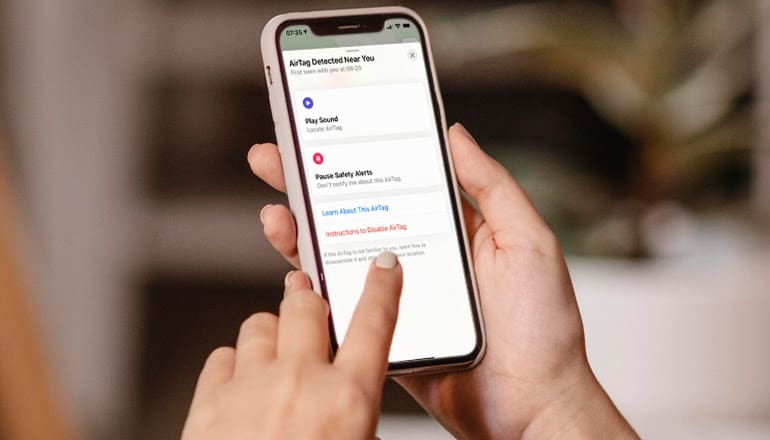
Now, you might be thinking, “Why is an alarm ringing?” It’s Apple’s unique way of safeguarding your privacy and security by making sure you notice the alert signals. Every alarm serves as a heads-up to check for an unexpected AirTag around you. The presence of this alarm reflects a strong stand against unwanted AirTag tracking.
Picture your gadget without this feature. An intrusive person could be tracking your every move, and you’d be none the wiser – pretty creepy, right?
With tech advancements moving so quickly, staying on guard for our safety is important. This is where alarm signals like consistent beeping come into play. These alarms are designed to ward off unwanted meddling, and yes, a strange AirTag nearby is definitely an unwanted interference that needs your instant attention.
Your next step is pretty important. The importance of paying heed to these warning signals cannot be stressed enough – sometimes, a simple alert can make the difference between keeping your privacy intact and risking it in the massive world of personal tech we’re in today.
Beeps During Setup and Location of Lost Items
When you’re setting up your AirTag, you’ll likely hear beeps; these sounds are from smart design choices by Apple, confirming that the AirTag is working fine. Apple, the tech giant, engineers each AirTag to have a unique audio process; this is done to get new users more involved.
Now, imagine you’re starting up a new device, and there’s silence; would you be sure it’s working? You could get a few hints from visual clues, but a beep is tough to miss. That beep during setup? It’s acting as proof that your device is powered up and ready to roll.

Whether your AirTag is hitched to your keys, tucked into your pocket, hooked up to your pet’s leash, or stashed somewhere else, one thing’s for sure – its job is to keep your stuff from getting lost. How does the AirTag really nail this job?
Sound, just like during setup, is key to the AirTag’s finding power. Put a marker on a missing item in the Find My app, and bingo – the linked AirTag starts making sounds that grow louder as you get closer to the misplaced item. So, even well-hidden or cluttered items like keys in couch cushions or in a messy bag stand a better shot at being found.
The importance of the beep comes into play, big time, when you consider its usefulness in noisy places or when you can’t just rely on your eyes. The beeping turns into your personal, audible guide, an escape from the restriction of just depending on geographic location info. You see, when you’re scrabbling around for those lost keys under your sofa, a GPS can’t quite cut it; that beeping sound, though, it can.
The AirTag’s sound feature takes center stage in two main ways: it not only helps ramp up user involvement but also serves as an essential aid in tracking down lost stuff. The focus is shifting away from simply following the trail on a map to zooming in on the exact spot.
Turning Off the Lost Mode to Stop the Beeping
Need a hand managing your AirTag notifications? Got you covered; it’s easy to turn off that annoying “Lost Mode” ringing with just a few taps on your iPhone. You’re probably eager to ditch that distracting noise, so let’s get started.
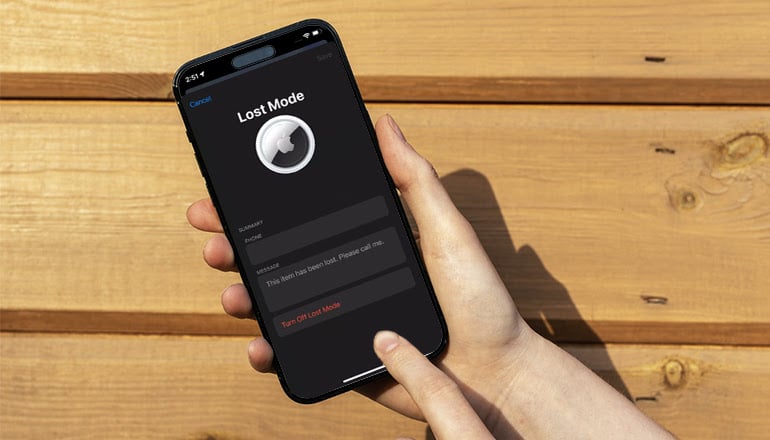
Alright, first, you’ll need to wake up your iPhone and open the “Find My” App. Once you’re in, head straight to the “Items” tab located conveniently at the bottom. From there, you’ll see all your synced AirTags. Now, the trick is to find the particular AirTag that’s causing all the racket. Found it? Great! Just give it a tap.
Now, hold on tight – your next mission is to scroll down until you spot the “Lost Mode” button and give that button a solid tap as well.
The next screen might seem a little odd – it displays the “Enable” button. But no worries, you’re doing everything just right. Your next move is to tap on that “Enable” button. The moment you do, a new screen will show up, displaying some gorgeous words: the “Turn Off Lost Mode” button. Well, you clicked that quick as a wink! Hats off to you! You’ve successfully put that pesky “Lost Mode” to bed on your AirTag.
Re-pairing the AirTag to Address the Issue
Begin by removing your AirTag from the “Find My” app on your iPhone. Just look for the “Items” tab — it’s right there at the bottom of your screen – and tap it. Then, it’s all about finding and picking your problem-causing AirTag. At the bottom of your screen, there should be a button that says “Remove Item.” Tap on it, and keep in mind that your AirTag and iPhone won’t be linked anymore.
Trust me, you’ll be amazed at how simple this all is, but the truth is, we’re just halfway there.
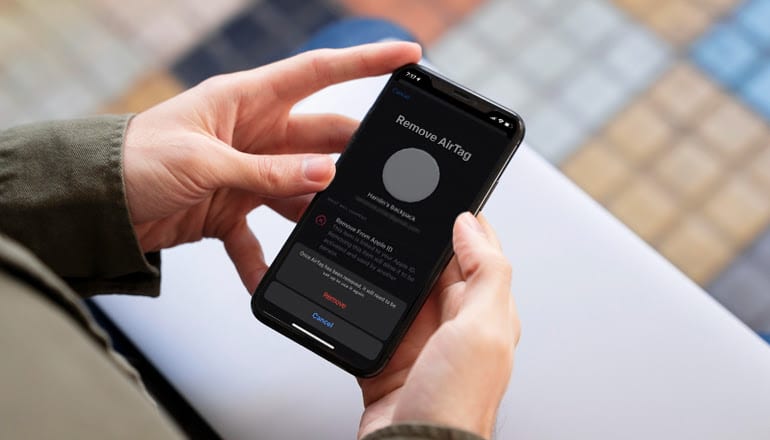
Now, about reconnecting. Bring your unlinked AirTag close to your iPhone. It’s remarkable, but when they’re close enough, a message will pop up on your screen, just like the first time you paired them. The next steps are a piece of cake. Just do as the directions on the screen tell you: give a unique name to your AirTag and place it into a pre-set category. With just a few more taps—yup, you got it – your AirTag will be linked back to your iPhone.
So, all done! Sometimes, a basic restart can silence your AirTag’s constant and, let’s be honest, annoying beeping. Disconnecting and reconnecting are ways to refresh the AirTag’s software and fix any weird glitches that might be causing the issue.
Think about this solution as giving your AirTag a little break. It gives the AirTag a chance to chill for a bit, then get back to work, beeping-free and reessentialized. We have a hunch that trying this out might finally bring some peace and quiet to your surroundings. Really, don’t hold back; jump in and give this fix a whirl – it could be the silence bringer you’ve been looking for.
Replacing the Battery to Stop the Beeping
When your AirTag battery is running low, it might mess up tracking services, kind of like a lighthouse beam acting up in a storm. So, what’s the AirTag’s fix for this problem? Well, it lets you in on the low power situation by beeping – loud and clear.
Does this sound like your AirTag is acting up? It might be good to consider an easy fix you can do at home – swapping out the battery. Don’t worry if you don’t know a whole lot about tech; the method is straightforward and simple.
Kickstart the battery change by gently pressing and twisting the silver back panel of your AirTag to the left. This will open up the round battery holder. Just make sure you’ve got a CR2032 battery ready – you can find them in most supermarkets and electronics stores.
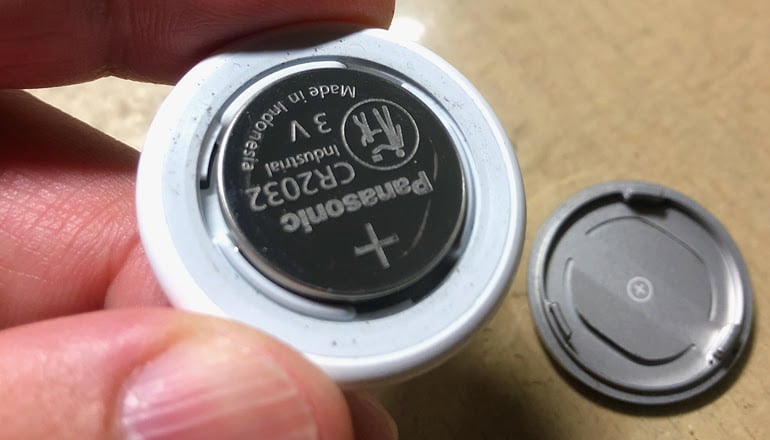
Once you’ve got your AirTag open, out with the old battery and in with the new CR2032, keeping the “+” symbol facing up. Then, get the silver cap back on, twist it to the right, and listen for the click.
When you do, listen closely. You’re supposed to hear a unique sound that confirms a successful reset.
Did you get that? Great job! But hold your horses when you’re fitting the cover back again; press on it lightly and spin it towards the right for it to click into place.
And there you go – you’ve done it! A successful battery change for your AirTag. Taking on this easy project could be exactly what you needed to get that never-ending beep to stop.
Connecting with Apple Support
Apple’s first-rate customer service is famous for being trusty, so don’t rule out a constantly sounding AirTag. So, when should you ask for help? Perhaps you’ve got an AirTag that won’t stop beeping or one giving false low-battery warnings. Or it might be making sounds that interfere with your other AirTag duties.
If you’re having trouble with your AirTag and none of these tips work for you, contact Apple for quick, expert help. Your device might need fixing under warranty or outright replacement.
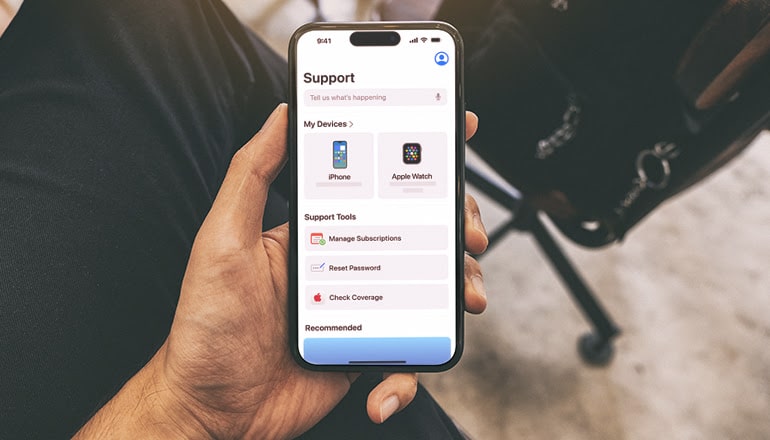
The skilled team there is ready to dig into your AirTag problems, often related to the ties between hardware and software. These ties can become complex issues – a possible reason for your AirTag’s non-stop beeping.
So, the reasons why an AirTag won’t quiet down can be tough to crack. Each solution stands alone, mirroring our personal run-ins with tech gadgets. But don’t worry—various tactics can help jump these hurdles. It could be as simple as tweaking your settings or checking the battery to solve the irritation.