How to Make Alexa Stop Saying OK (Quick and Easy!)
Do you feel like your Amazon Alexa is a bit too chatty sometimes? Do you want her to just get to the point already?
If so, you’re not alone. Alexa is notorious for speaking back too much and saying OK after just about every command you give her.
Read on to learn how to easily minimize and streamline her responses and ultimately make Alexa stop saying OK altogether.
How to Make Alexa Stop Saying OK
You can make Alexa stop saying OK by enabling “Brief Mode.” Once enabled, Alexa will stop saying OK and use a brief tone instead! To do this open the Amazon Alexa app and click on “More” and then “Settings.” Scroll down to “Voice Responses” and click on “Enable Brief Mode.“
How to enable Brief Mode step-by-step
Maybe you’re in a rush, have guests over, or have a sleeping baby nearby and you just want Alexa to do what you ask her to do without back-and-forth “conversation.”
Brief Mode can help with this, making Alexa talk less and use sounds and brief tones instead of words to confirm the execution of commands.
To enable Brief Mode:
1) Open up the Alexa app on your smartphone

2) Once in the app, click on More in the lower right-hand corner and then on Settings
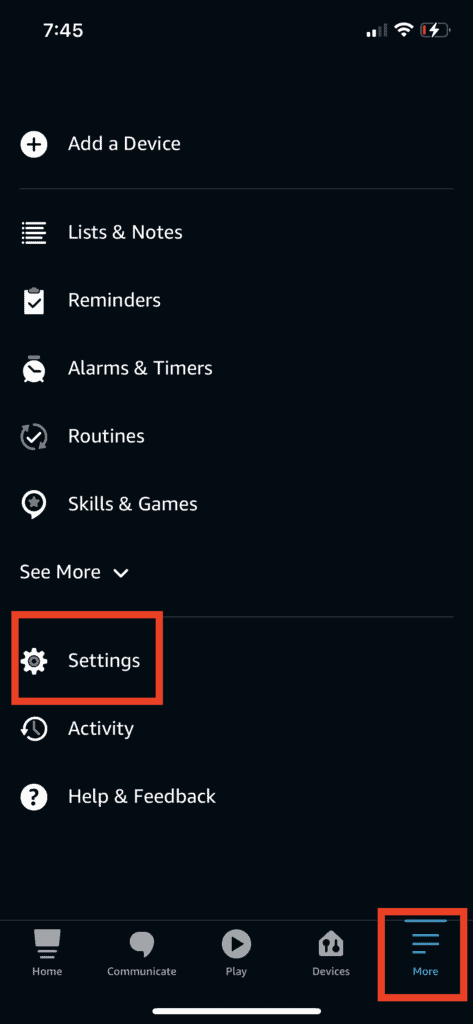
3) Scroll down to the Alexa Preferences section and click on Voice Responses
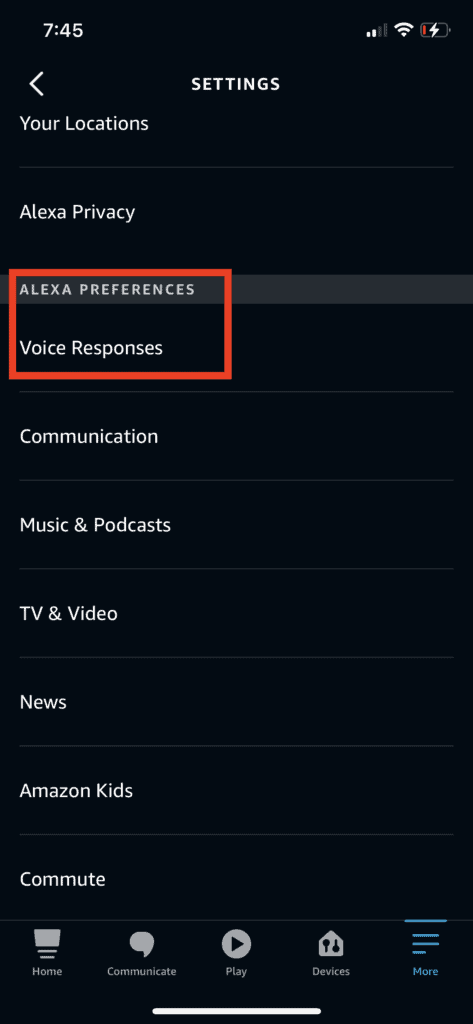
4) Enable Brief Mode
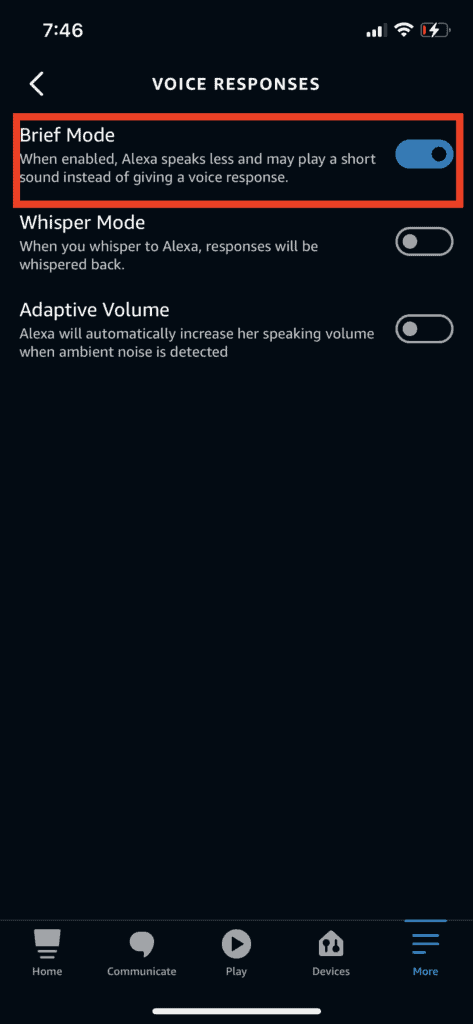
As an FYI, Brief Mode is what Amazon calls a “global feature” which just means that once you enable it in your Alexa app, it will be enabled for all of your Alexa devices at once.
Brief Mode
Amazon introduced Brief Mode in 2018 in response to users’ complaints about the chattiness of Alexa. If you’ve used Alexa for more than a month or so, you know exactly what they’re talking about.
Sometimes she will just go off on a tangent for over a minute about something you never even asked.
Ask her to play a song and she might repeat the entire song, artist, and album name back to you to confirm she has it right before playing.
Or maybe you have a smart home like me and you use Alexa to turn on and off lights all day long – you’ll get really annoyed when Alexa responds “OK, turning the lights on” after every single command you give her.
Luckily Amazon took these complaints seriously and released Brief Mode to address this.
Whisper Mode
While you’re in the “Voice Responses” settings of the Alexa app, you’ll notice an option to enable another feature called “Whisper Mode.”
This is yet another way to “limit” Alexa’s replies, except this limits how loudly she speaks.
Once enabled, if you ask Alexa a question or give her a command in a whisper, she will reply back in a whisper.
This is great when someone is sleeping and/or if it’s late at night and you don’t want Alexa blaring throughout the home waking everyone up.
Similar to Brief Mode, Whisper Mode is a global setting so once you enable it, it will become active on all your Amazon Alexa devices throughout your home.
Adaptive Volume
The last feature you’ll find in the “Voice Responses” settings of the Alexa app is “Adaptive Volume.”
This is a pretty neat feature that is able to pick up on any ambient noise in the background and increase Alexa’s volume accordingly.
Let’s say for example that you have people visiting and there is a conversation happening nearby. You’re in the middle of cooking and have a timer going with Alexa.
When you ask Alexa “Hey Alexa, how much time is left on my timer,” Alexa will automatically detect the conversation noise nearby and answer you louder than she normally would.
This is another extremely useful feature by Alexa, all in an effort to make the device more situationally aware and dynamic.
Conclusion
If you’ve used an Amazon Echo or Show for even a few days, you’ve probably wondered how to make Alexa stop saying OK after every single command you give her.
Thankfully, Amazon released a feature called “Brief Mode” that once enabled forces Alexa to stop saying OK all the time and to speak less overall. Instead of words, Alexa uses a brief tone instead.
In addition to Brief Mode, Alexa also offers Adaptive Volume and Whisper Mode. These features adjust the volume of Alexa’s voice up or down, respectively, based on surrounding noise and feedback.
Used together, these Voice Preferences can really dial in your Alexa so that she is less disruptive.