How Much Bandwidth Does Alexa Use? (HINT: Watch Out for Music!)
Many internet providers today allow for unlimited data usage, however, there are some that enforce data caps (possibly as low as 10GB per month!)
If you’re on one of these low-data cap internet plans, it’s a good idea to have a sense of how much bandwidth each connected device in your home is using. This will help ensure you remain under the cap and don’t get an unexpected bill.
Alexa’s bandwidth usage
On average, Alexa uses 36MB of bandwidth per day (or 252MB of bandwidth per week | 1.08GB per month). This average is based on the following daily usage: 30 minutes of music streaming, two smart-home commands, one weather inquiry, and one question.
Here is the exact daily breakdown of this 36MB data average, from smallest to largest usage:
| Alexa Command | Data Usage |
|---|---|
| “Alexa, turn on downstairs lights” | 5 kB |
| “Alexa, turn off downstairs lights” | 5 kB |
| “Alexa, what’s the weather today?” | 138 kB |
| “Alexa, when does the NFL season start?” | 240 kB |
| daily background usage, no commands | 7.244 MB |
| “Alexa, play Jack Johnson radio from Pandora” | 28.368 MB |
| Total daily data usage | 36 MB |
| Total weekly data usage (36 MB x 7 days) | 252 MB |
| Total monthly data usage (36 MB x 30 days) | 1.08 GB |

Method for calculating Alexa’s data usage
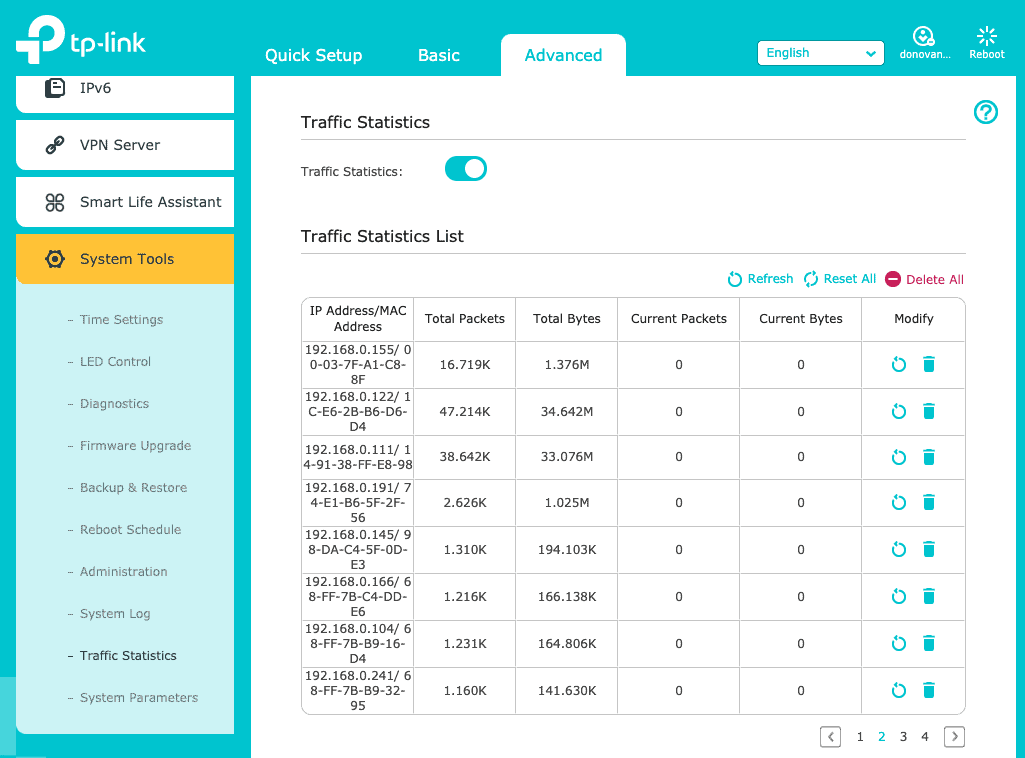
In order to calculate the exact data usage for each Alexa “command” listed above I used my TP-Link Archer router’s advanced traffic monitoring settings.
(If you haven’t already read my post on the Best Router for Your Smart Home, you should! The TP-Link Archer is the best budget smart home router on the market and it’s the one I use in my smart home. Check its price on Amazon.)
These settings allowed me to isolate and identify my Amazon Alexa and then monitor its direct usage.
To start, I had to figure out my Alexa’s MAC address.
You can think of a MAC address as a unique identifier. Every connected smart device in your home has one.
To find this MAC address, open the Alexa app, click “Devices” at the bottom, and then “Echo & Alexa” at the top.
Next, click on your Alexa device then scroll down to select “About”.
From there you should be able to see the MAC address.
Then it’s as simple as finding that MAC address in the TP-Link router’s traffic log. Now you’re ready to rock and roll!
Does Alexa use bandwidth all the time?
Yes, Alexa uses bandwidth all the time, even when you’re not “using” it.
This was a simple test to conduct once I identified my Alexa’s MAC address.
I simply cleared the data usage of my Alexa in the TP-Link traffic monitoring log and stopped using Alexa for the next 12 hours.
While “inactive,” my Alexa used 3.622 MB of bandwidth.

That means Alexa uses 7.244 MB of bandwidth while “not in use” each and every day.
This is a tiny amount of data being used in the background but it still factors into the total bandwidth numbers so it’s good to be aware of.
What Alexa command uses the most bandwidth?
By looking at the results, it’s pretty clear that playing music on Alexa uses the most bandwidth, by far.
Just 30 minutes of Pandora streaming resulted in 28.368 MB worth of data usage.
While this is still a relatively minuscule amount of data, it can add up over time.
Let’s say, for example, instead of 30 minutes a day, you listen to 3 hours of music a day. That’s about 170 MB of data daily, or 5.1 GB of data monthly.

Again, for most of us, this is not a problem and not something worth even thinking about.
But if you’re one of the unlucky few with an internet plan that has a crazy low data cap of say 10 GB, then that’s something you should definitely be aware of.
The most commonly used Alexa command
In 2018, Venture Beat conducted a survey with smart speaker users to determine how often they were using their smart speakers and for what purpose.
The results found that the majority of people use their smart speakers multiple times per day.
For us smart home users, this shouldn’t be a surprise. We use our smart speakers to turn on and off lights all day long, amongst other commands.
I would argue that this trend has only continued over the past few years, as more and more Americans have smart speakers in their homes.
The survey also found that the most common smart speaker use-case was…you guessed it – music. More than 75% of users listed music as their number one use.
People love listening to music on their smart speakers, and it’s no mystery as to why.
Alexa and Google Assistant make it so simple to start, or stop listening to music, whenever you’re in the mood.
Should I worry about Alexa’s data usage?
99% of you don’t need to worry about your monthly internet data usage, so Alexa’s data usage isn’t a concern.
For the other 1%, my condolences.
It’s one thing to have to worry about cell phone usage every month. I can’t imagine having to also worry about home internet usage.

Just make sure you look over your internet plan details and see what kind of data cap, if any, exists.
A lot of times that cap will be unlimited or 1 TB. A terabyte is A LOT of data.
So if that’s your “cap,” not to worry. Even heavy Netflix-using households would be stretched to hit 300 GB of data usage.
But even for those people with low data caps (say 10 – 50 GB), in MOST cases you can go and your internet will still work, your speeds will just be greatly reduced.
Conclusion
Amazon Alexa does not use much bandwidth – you can expect it to consume about 1 GB per month.
Even while your Alexa is not “in use,” it does consume some bandwidth, although very little.
Streaming music uses the most data by far, so if Alexa data usage is a concern of yours, think about scaling back your music playing.
99% of people don’t need to worry about Alexa’s bandwidth consumption at all.
For the other 1% that have internet plans with data caps, be conscious of how much you’re using Alexa and you should be just fine!
Thanks for reading!